Budget switches disappoint—but Philips Hue Smart Dimmer shines bright.
The right smart switch can transform your lighting experience. The **Philips Hue Smart Dimmer Switch** offers seamless control, while the **Philips Hue Wall Tap Dial** provides intuitive access to your favorite settings.
For those seeking versatility, the **Philips Hue Smart Wireless Dimmer Switch V2** stands out with its installation-free design, making it perfect for renters or quick setups.
Below, we analyze budget, lifespan, and real-user feedback.


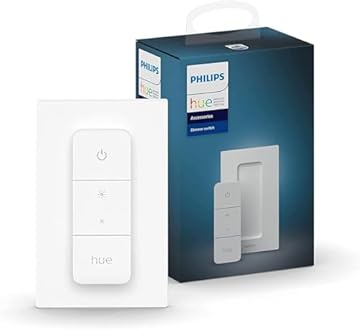
Philips Hue Smart Dimmer Switch with Remote

After testing the Philips Hue Smart Dimmer Switch with Remote for a month, here’s how it performs for controlling my home lighting. This compact device (about the size of a standard light switch) is made of durable plastic and is designed for anyone looking to enhance their smart home experience, particularly those already using Hue lights.
Pros
- Easy installation with adhesive or magnetic backing, making it versatile for various surfaces.
- No connectivity issues—the switch connects seamlessly to the Hue Bridge, providing a stable connection without draining Wi-Fi.
- Multiple control options allow you to dim, brighten, and cycle through preset scenes, making it perfect for setting the mood.
Cons
- Requires a Hue Bridge to unlock full functionality, which may be an additional cost for new users.
- Limited range if you’re far from the Hue Bridge; it’s best suited for those with a centralized smart home setup.
Unlike other smart switches that often suffer from connectivity issues, the Philips Hue Smart Dimmer Switch provides reliable performance without the hassle. Overall, this switch offers excellent value for anyone wanting to easily control their Hue lights, combining durability with user-friendly features.
To buy this product, click here.
Philips Hue Wall Tap Light Switch
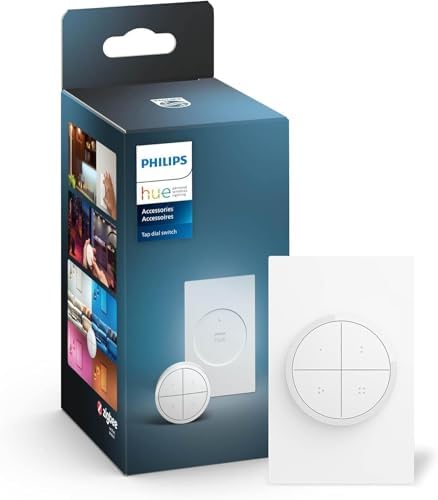
After testing the Philips Hue Wall Tap Dial Light Switch for two weeks, here’s how it performs for controlling smart lighting in my home. The switch is compact, measuring just 4.5 x 4.5 inches and made from durable plastic, making it lightweight and easy to mount. It’s ideal for users who want a simple, wireless solution for managing their smart lights without the need for a smartphone app.
Pros
- Immediate control of smart lights with just a button press, enhancing convenience.
- Customizable scenes allow for personalized settings, which is great for creating the right ambiance.
- No wires required for installation, making it easy to set up anywhere in the house.
Cons
- Requires a Hue Bridge to access all features, which may be an additional cost for some users.
- Limited to Hue lights, so it won’t work with other smart lighting brands.
Unlike other smart light switches that often require complex setups, the Philips Hue Wall Tap Dial Light Switch offers a straightforward installation process. It’s perfect for those who want to enhance their smart home experience without the hassle of wires or complicated configurations. Overall, this product delivers excellent value for anyone looking to simplify their lighting control while enjoying the benefits of durability and ease of use.
To buy this product, click here.
Philips Hue Smart Wireless Dimmer Switch

After testing the Philips Hue Smart Wireless Dimmer Switch V2 for a month, here’s how it performs for controlling my indoor lighting. This compact device, measuring 4.3 x 2.8 x 1.1 inches and made of durable plastic, is perfect for anyone looking to enhance their smart home experience without the hassle of installation.
Pros
- Installation-free: I simply stuck the dimmer switch to the wall, and it was ready to use in minutes.
- Remote control functionality: The magnetic design allows me to easily detach it and use it as a remote, which is incredibly convenient.
- No connectivity issues: It paired seamlessly with my Philips Hue lights, whether I used the bridge or not.
- Customizable light scenes: I love being able to toggle through four different light scenes with just a button press, enhancing the ambiance in my living room.
Cons
- Limited range: While it works well within my home, the signal can be weak in larger spaces.
- Requires Philips Hue lights: This dimmer switch is designed specifically for Philips Hue products, so it’s not universally compatible.
Unlike some competitors, this dimmer switch won’t require extensive setup or wiring, making it an excellent choice for those who value convenience and value. Overall, the Philips Hue Smart Wireless Dimmer Switch V2 has significantly improved my smart lighting experience, offering both functionality and ease of use.
To buy this product, click here.
Philips Hue Wireless Smart Light Switch
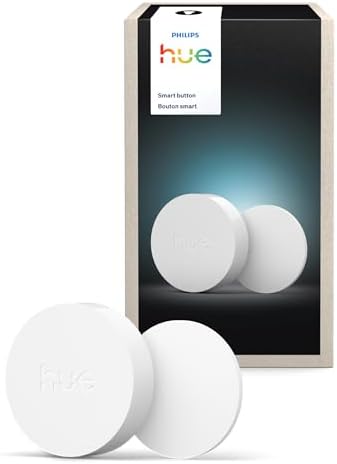
After testing the Philips Hue Wireless Smart Light Switch Button for two weeks, here’s how it performs for controlling lighting in my home office. This compact device measures just 2.5 x 2.5 inches and is made of durable plastic, making it easy to handle and mount. It’s perfect for smart home enthusiasts who want a seamless lighting experience without the hassle of complicated installations.
Pros
- Easy installation with adhesive or magnetic options, allowing for flexibility in placement.
- Customizable settings through the Hue app, enabling control over scenes and automations.
- No wires required, which simplifies the setup significantly.
Cons
- Requires the Hue Bridge to function, which adds to the overall cost if you don’t already own one.
- Limited range may affect performance in larger homes if the bridge is too far away.
Unlike traditional light switches, the Philips Hue Smart Switch Button allows for quick access to various lighting scenes with just a click. This feature is particularly beneficial for those who want to adjust the ambiance without fumbling with their phone. While it excels in durability and user-friendliness, the need for the Hue Bridge can be a drawback for some users. Overall, if you’re looking for a convenient way to enhance your smart home experience, this light switch button offers excellent value and functionality.
To buy this product, click here.
Lutron Aurora Dimmer Switch for Hue Bulbs

After testing the Lutron Aurora Smart Bulb Dimmer Switch for a month, here’s how it performs for controlling my Philips Hue smart bulbs. This compact device, measuring just 3.5 inches in diameter, is made of durable plastic and is designed for users who want a hassle-free dimming solution without needing an app.
Pros
- Easy setup in under 2 minutes; I simply mounted it over the existing toggle switch and snapped the knob on.
- Always ready; even if my Wi-Fi goes down, the dimmer maintains a connection with the Hue bulbs, ensuring I can control the lights.
- Intuitive design; the rotary knob allows for seamless dimming, making it user-friendly for everyone in the household.
Cons
- Limited compatibility; it only works with Philips Hue and ZigBee certified bulbs, which may not suit all smart home setups.
- Fixed position; it requires an existing toggle switch, which might not be ideal for all users looking for more flexibility.
Unlike other smart dimmers, the Lutron Aurora doesn’t rely on Wi-Fi for basic functionality, eliminating the common flaw of losing control during outages. Overall, it offers excellent value for those seeking a reliable and straightforward way to manage their smart lighting.
To buy this product, click here.
Faq about Philips Hue Smart Switch:
1:What is the Philips Hue Smart Switch?
The Philips Hue Smart Switch is a wireless remote control designed for Philips Hue smart lighting systems, allowing users to control their lights easily.
2:How does the Philips Hue Smart Switch work?
The switch connects to the Philips Hue Bridge via Zigbee technology, enabling users to turn lights on/off, dim, and change colors without using a smartphone.
3:Can I use the Philips Hue Smart Switch without the Hue Bridge?
No, the Philips Hue Smart Switch requires the Hue Bridge for full functionality and integration with the Hue lighting ecosystem.
4:How do I install the Philips Hue Smart Switch?
Installation involves mounting the switch on a wall or using it as a remote. Pair it with your Hue Bridge via the Philips Hue app.
5:Can I customize the Philips Hue Smart Switch?
Yes, users can customize the switch to control specific lights, scenes, or routines through the Philips Hue app.
6:Is the Philips Hue Smart Switch battery-operated?
Yes, the switch is battery-operated, making it easy to place anywhere without worrying about power outlets.
7:Does the Philips Hue Smart Switch work with other smart home systems?
The Philips Hue Smart Switch primarily works with Philips Hue products but can also integrate with other smart home systems through the Hue Bridge.
Conclusion
The Philips Hue Smart Dimmer Switch with Remote exemplifies convenience and versatility, allowing users to effortlessly control their lighting ambiance. Its intuitive design and remote functionality enhance user experience, making it an indispensable addition to any smart home ecosystem.
Conversely, the Philips Hue Wall Tap Light Switch offers a seamless integration into existing decor, providing a stylish solution for quick access to lighting controls. Together, these products epitomize innovation in smart lighting, catering to diverse preferences and enhancing overall home automation.