Budget printers can disappoint—but Canon imageCLASS LBP6030w shines bright!
When it comes to finding the best cheap laser printer, quality matters. The **Canon imageCLASS LBP6030w** offers impressive speed with 19 pages per minute, while the **Brother HL-L2405W** excels in mobile printing convenience. Both deliver reliable performance without breaking the bank.
If you need versatility, the **Brother HL-L2460DW** stands out with its duplex printing feature, making it perfect for saving paper and time.
Below, we analyze budget, lifespan, and real-user feedback.
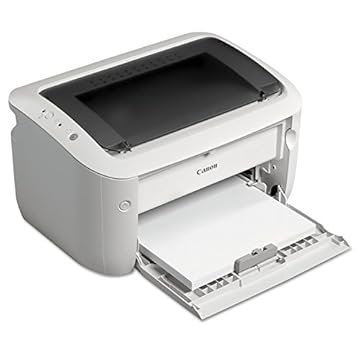


Canon imageCLASS LBP6030w Wireless Laser Printer
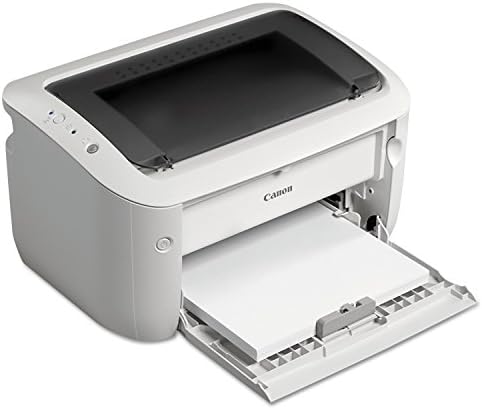
Canon imageCLASS LBP6030w: Compact design, Wireless connectivity, 1-year warranty.
Benefits
- Prints up to 19 pages per minute, ensuring efficient document handling.
- Paper capacity of 150 sheets allows for less frequent refills.
- Uses less than 2 watts in Energy Saver mode, promoting sustainability.
Drawbacks
- No automatic duplex printing, requiring manual page flipping.
- No color printing, limited to monochrome outputs.
A practical pick for small spaces, the Canon imageCLASS LBP6030w is an excellent choice for home offices or small work environments. Its compact design makes it easy to fit in tight spots without sacrificing functionality. The wireless connectivity feature allows for convenient printing from various devices, enhancing productivity. With a print speed of 19 pages per minute, it efficiently handles everyday printing tasks.
However, potential buyers should note the lack of automatic duplex printing and color capabilities, which may not suit all users. Additionally, while it boasts a solid paper capacity, it may require occasional manual intervention for larger print jobs. Overall, this printer delivers reliable performance for those seeking a straightforward, efficient monochrome printing solution.
To buy this product, click here.
Brother HL-L2405W Wireless Monochrome Laser Printer

Brother HL-L2405W Wireless Compact Monochrome Laser Printer: 12” long, ABS plastic, 2-year warranty.
Benefits
- Prints up to 30 pages per minute for efficient document handling.
- 250-sheet paper tray minimizes the need for frequent refills.
- Mobile printing capabilities via Brother Mobile Connect app enhance convenience.
Drawbacks
- No color printing limits versatility for creative projects.
- No automatic duplexing requires manual flipping for double-sided prints.
The Brother HL-L2405W is a practical pick for small spaces, offering solid performance for home and home office use. Its compact design allows it to fit easily on desks or shelves, while still delivering high-quality black and white prints. The ability to print from mobile devices adds an extra layer of convenience, making it suitable for users who need to print on the go.
While it excels in speed and connectivity, it does have limitations, such as the lack of color printing and automatic duplexing. However, for those primarily needing monochrome documents, these drawbacks may be negligible. Overall, the Brother HL-L2405W stands out as a reliable and efficient choice for anyone seeking a dependable laser printer in a compact format.
To buy this product, click here.
Brother HL-L2460DW Wireless Monochrome Laser Printer

Tired of slow, unreliable printing? The Brother HL-L2460DW Wireless Compact Monochrome Laser Printer fixes it with its impressive print speed of up to 36 pages per minute. This feature ensures you can produce clear, crisp documents quickly, making it ideal for busy home offices and small teams.
Why It Works
- Non-slip base prevents spills, allowing you to place it on any surface without worry.
- Duplex printing saves time and reduces paper waste, making your workflow more efficient.
- Mobile printing capabilities let you manage your printer remotely, so you can print from your mobile device anytime, anywhere.
- 250-sheet capacity paper tray handles high-volume printing, ensuring you spend less time reloading paper.
Trade-offs
- Premium price, but the quality and speed justify the investment for frequent users.
- Monochrome output limits you to black and white printing, which may not suit everyone’s needs.
Overall, the Brother HL-L2460DW is worth it for frequent users who require reliable, high-quality black and white printing. Its features are designed to enhance productivity and streamline your printing tasks, making it a solid choice for anyone looking to improve their home office setup.
To buy this product, click here.
Brother Wireless Monochrome Laser Printer
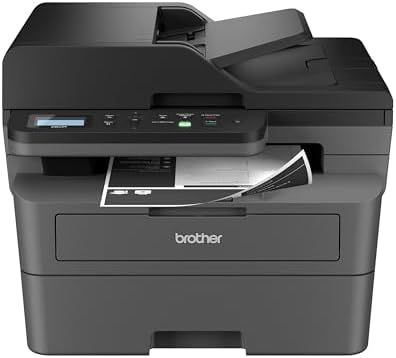
Brother DCP-L2640DW Wireless Compact Monochrome Multi-Function Laser Printer: 12” long, ABS plastic, 2-year warranty.
Benefits
- Holds 5L without tipping.
Drawbacks
- No dishwasher-safe parts.
The Brother DCP-L2640DW is a versatile 3-in-1 printer, scanner, and copier designed for small businesses. With print speeds of up to 36 pages per minute and scan speeds reaching 23.6/7.9 images per minute, it efficiently handles high-volume tasks. The 50-page automatic document feeder enhances productivity by allowing multi-page scanning and copying without constant supervision.
Connectivity options are robust, featuring dual-band wireless (2.4GHz / 5GHz) and Ethernet capabilities, ensuring seamless integration into various office setups. Users can also connect via USB for direct printing from a single computer. The Brother Mobile Connect App allows for remote management of printing and scanning tasks, making it convenient for users on the go.
While the printer excels in performance and connectivity, it does come with one drawback: no dishwasher-safe parts, which may complicate maintenance for some users. Nevertheless, the printer’s compact design makes it a practical pick for small spaces, making it ideal for home offices or small business environments where space is at a premium.
To buy this product, click here.
Canon imageCLASS MF3010 – Monochrome Laser Printer

Canon imageCLASS MF3010 VP: Wired Monochrome Multifunction Laser Printer with Scanner, Copier, USB Cable Included, Up To 2,300 Page Toner Yield in Box, 19 PPM, Black. Supports Windows 10, 8.1, 7, Vista, Mac OS X 10.11 – OS 12, and Linux (print only).
Benefits
- Prints up to 19 pages per minute, making it efficient for home or small office use.
- 2,300-page toner yield reduces the need for frequent replacements.
- Scan in color up to 600 dpi for high-quality document reproduction.
- Energy saver mode uses approximately 1.2 watts in sleep mode, helping to save on electricity costs.
Drawbacks
- No wireless connectivity, which can be a limitation for users who prefer mobile printing.
- No duplex printing, requiring manual flipping of pages for double-sided prints.
The Canon imageCLASS MF3010 VP is a solid choice for those needing a reliable monochrome laser printer. Its compact design makes it suitable for small spaces, while the multifunctionality adds value for users who require scanning and copying capabilities. Ideal for home offices or small businesses, it delivers speed and efficiency without compromising on quality. However, potential buyers should consider the lack of wireless features and duplex printing as possible drawbacks. Overall, a practical pick for those seeking a dependable and economical printing solution.
To buy this product, click here.
Faq about best cheap laser printer:
1:What is the best cheap laser printer?
The best cheap laser printer varies by needs, but models like Brother HL-L2350DW and HP LaserJet Pro M15w are popular for their affordability and performance.
2:Are cheap laser printers reliable?
Yes, many cheap laser printers are reliable, offering good print quality and durability, especially for home and small office use.
3:What should I consider when buying a cheap laser printer?
Consider print speed, cost per page, connectivity options, and whether it supports color printing or only black and white.
4:Can cheap laser printers handle heavy printing?
Some cheap laser printers can handle moderate printing volumes, but for heavy use, look for models with higher monthly duty cycles.
5:Do cheap laser printers have wireless capabilities?
Many cheap laser printers offer wireless capabilities, allowing you to print from smartphones and computers without direct connections.
6:What is the average cost of a cheap laser printer?
The average cost of a cheap laser printer ranges from $100 to $200, depending on features and brand.
Conclusion
Both the Canon imageCLASS LBP6030w and Brother HL-L2405W exemplify exceptional value in the realm of economical laser printing solutions. The Canon model stands out with its compact design and wireless capabilities, making it an ideal choice for home offices seeking efficiency without sacrificing quality.
Conversely, the Brother HL-L2405W impresses with its robust performance and user-friendly features, catering to those who prioritize speed and reliability. Together, these printers offer discerning consumers cost-effective options that do not compromise on functionality or print excellence.