Transform your creativity with a 3D printer at home, making intricate designs and projects effortlessly.
A 3D printer at home opens up a world of possibilities for hobbyists and professionals alike. The Tina2 Basic is perfect for beginners, offering a fully assembled and auto-leveling experience. With a removable magnetic platform, it ensures high precision printing, making it ideal for both kids and adults. Another great option is the upgraded Tina2S, which features WiFi cloud printing and silent operation, catering to a versatile range of users.
These printers are designed for various applications, from educational projects in schools to creative home designs. They provide a user-friendly interface, making them perfect for anyone looking to explore 3D printing. The complete starter kit includes everything you need to get started, including PLA filament and an SD card.
In this review, we will delve deeper into the features and benefits of these 3D printers. You will learn how each model can enhance your creative projects, making them a valuable addition to your home.

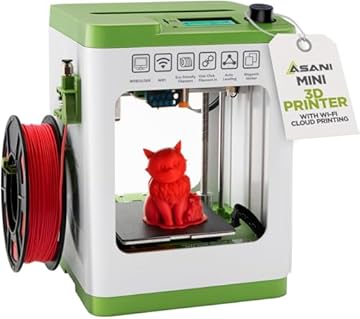
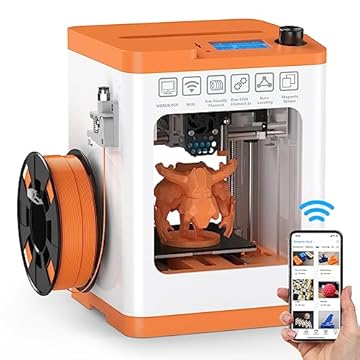
Tina2 Basic Fully Assembled 3D Printer

Tina2 3D Printer is designed to provide an accessible entry point into the world of 3D printing, ideal for beginners, kids, and educational settings. Its compact size of 8.3” x 8.3” x 11.4” and lightweight design (3kg) ensure that it fits comfortably on any desk or workspace, making it perfect for home use, classrooms, and dorm rooms. The printer features a build volume of 100x105x100mm, allowing users to create a variety of small-scale projects with ease.
This 3D printer significantly enhances the user experience by eliminating complex setups. Fully assembled and equipped with auto-leveling capabilities, it solves the common problem of manual bed leveling, which can be daunting for beginners. The intelligent leveling system automatically adjusts to uneven surfaces, ensuring a hassle-free printing process. Additionally, the removable magnetic platform allows for easy model removal, further simplifying the printing experience.
Pros
- Easy to use for beginners and kids, with no complex setup required.
- Compact and lightweight design, making it portable and suitable for various environments.
- Auto-leveling feature saves time and reduces frustration.
- High precision printing thanks to dual Z-axis rails, enhancing detail quality.
- Includes a 2.4″ LCD screen and supports offline printing via MicroSD card.
Cons
- Limited build volume may restrict larger projects.
- Price may be higher compared to basic models, reflecting its advanced features.
- Some users may prefer more advanced settings not available in this beginner-friendly model.
In terms of performance, the Tina2 3D Printer stands out with its dual Z-axis design, which provides stability and enhances printing precision. Its user-friendly interface, including knob operation and one-button filament loading, ensures that even kids can navigate the printing process with minimal guidance. This product is best suited for hobbyists, educators, and anyone looking to introduce 3D printing in a fun and manageable way.
Overall, the Tina2 3D Printer offers excellent value for its target audience, making it an ideal choice for beginners and children eager to explore their creativity through 3D printing.
To buy this product, click here.
Mini 3D Printer Starter Kit for Kids
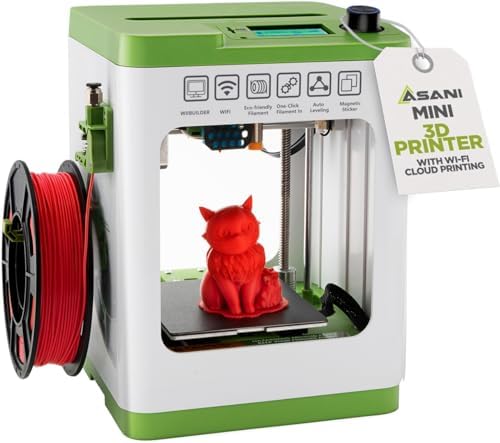
The Fully Assembled Mini 3D Printer for Kids and Beginners is designed to simplify the world of 3D printing, making it ideal for young creators, educators, and hobbyists. This complete starter kit includes everything needed to embark on creative projects, featuring a mini printer, 10M of PLA filament, a microSD card with pre-installed models, and essential accessories. With dimensions of 8.3” x 8.3” x 11.4”, this compact printer is perfect for home use, classrooms, or dorms, ensuring a seamless 3D printing experience.
This 3D printer addresses common challenges faced by beginners, such as complicated assembly and technical difficulties. Its fully assembled design guarantees reliable performance right out of the box, while the easy auto-leveling feature and dual z-axis rail provide high-precision prints. The user-friendly 2.4” LCD screen and flexible magnetic build plate enhance usability, allowing users to focus on creativity rather than technical hurdles.
Pros
- Problem Solving Capability: The auto-leveling feature eliminates the need for manual adjustments, making it accessible for kids and beginners.
- Durability: Built for long-term use, this printer is designed to withstand the rigors of frequent use.
- Ease of Use: One-touch filament loading and Active Pause & Resume Print functions simplify the printing process.
- Versatile Compatibility: Works seamlessly with MAC, Windows, and Linux, supporting various slicing software.
- Compact Size: Space-saving design allows it to fit in small areas without sacrificing performance.
Cons
- Limited Filament Compatibility: Only compatible with specific filament types, which may restrict material choices.
- Price Point: While reasonable for a starter kit, it may be considered slightly higher than basic models.
- Minor Size Restrictions: The print size is limited due to its compact design, which may not suit larger projects.
In terms of performance, the Fully Assembled Mini 3D Printer stands out with its reliable printing capabilities and user-friendly features. It is best suited for children, beginners, and educators looking to introduce 3D printing in a fun and engaging way. The minor drawbacks, such as filament compatibility and size restrictions, are outweighed by its ease of use and the creativity it fosters. This printer is an excellent choice for anyone eager to explore the exciting world of 3D printing.
To buy this product, click here.
HEPHI3D Tina2S Mini 3D Printer

The Upgraded Tina2S 3D Printer is designed to simplify the 3D printing experience, making it ideal for beginners, hobbyists, and educational environments. This compact and fully assembled printer features a sleek design, measuring just 15.7 x 15.7 x 15.7 inches, and is available in a modern black finish. Constructed from high-quality materials, it ensures durability while delivering impressive printing capabilities.
The Tina2S addresses common 3D printing challenges by offering features like WiFi cloud printing and auto bed leveling, allowing users to create intricate models without the hassle of manual setups. Its self-developed app, “Poloprint Cloud,” provides access to a vast library of models, enabling one-click slicing directly from smartphones or tablets. This functionality significantly enhances user experience, especially for novices.
Pros
- Easy to Use: Fully assembled out of the box, perfect for beginners.
- Quiet Operation: Operates at 40-50 dB, ensuring a peaceful printing environment.
- Auto-Leveling: Dual X/Y/Z-axis auto-leveling simplifies setup and enhances print accuracy.
- Resume Printing: The resume function allows for uninterrupted printing after power outages.
- Versatile Compatibility: Supports various slicing software, allowing for extensive customization.
Cons
- Limited Build Size: The compact design may restrict larger projects.
- Price Point: Slightly higher than entry-level competitors.
The performance of the Tina2S 3D Printer is commendable, with a maximum print speed of 200 mm/s and a heatable platform that prevents warping, ensuring high-quality prints. The printer’s innovative cooling system further enhances print quality while reducing the risk of nozzle clogs. This printer is best suited for anyone looking to dive into 3D printing, from students to DIY enthusiasts.
In summary, the Upgraded Tina2S 3D Printer is an excellent choice for those seeking a user-friendly and reliable 3D printing solution. Its combination of advanced features and ease of use makes it a valuable addition to any home, school, or workshop.
To buy this product, click here.
AOSEED Beginner 3D Printer for Kids

AOSEED 3D Printer for Kids is designed to ignite creativity and foster learning through 3D printing, ideal for young enthusiasts and beginners. Its compact size, vibrant colors, and durable materials ensure a fun and engaging experience for users aged 8 and up. With key specifications including a 0.05 mm printing accuracy and a speed of up to 200 mm/s, this printer makes it easy for kids to create high-quality designs.
The AOSEED 3D Printer addresses the common challenges of starting with 3D printing, such as complexity and safety. With its user-friendly app, which is compatible with iOS, Android, and Windows, users can start printing with just one click. The fully enclosed structure adds a layer of safety, making it a great choice for home use.
Pros
- Simple one-click operation via a smart app enhances accessibility for kids.
- High precision and speed ensure professional-grade results.
- Access to a vast library of over 1,500 designs keeps creativity flowing.
- Built-in camera allows for real-time project monitoring and time-lapse creation.
- DIY customization options let users personalize their printer.
Cons
- Initial setup may require adult supervision for younger users.
- Limited to PLA filament, which may restrict material variety.
The performance of the AOSEED 3D Printer is impressive, especially for its target audience. The innovative quick-release nozzle simplifies filament changes, ensuring a hassle-free experience. The printer’s extensive design library, updated weekly, provides endless options for customization, making it a standout choice for families. However, the size and limitations regarding filament types could be drawbacks for more advanced users.
In summary, the AOSEED 3D Printer for Kids is an excellent entry-level device for young creators eager to explore the world of 3D printing. Its combination of safety features, ease of use, and creative potential makes it an ideal choice for families looking to foster STEM learning at home.
To buy this product, click here.
STEELIST Heavy Duty Printer Stand with Storage

STEELIST Printer Stand with Storage is designed to serve as a multifunctional solution for organizing your workspace efficiently. Ideal for home offices, small businesses, or any environment that requires a reliable printer and storage system, this printer stand is perfect for users who need a sturdy platform for their printer while also maximizing storage space. Its robust dimensions and sleek black finish ensure it complements any decor while providing a practical solution for clutter management.
This printer stand features a heavy-duty steel construction, which guarantees durability and longevity, unlike cheaper alternatives that may not withstand daily use. The dimensions are optimized for standard printers, and its modern design adds a touch of elegance to your workspace. The integrated shelves allow for convenient storage of books, documents, and office supplies, addressing the common problem of limited space in home offices.
Pros
- Exceptional durability due to steel construction, ensuring long-term use.
- Flexible movement with 4 rotating wheels, making it easy to reposition.
- Lockable cabinet doors provide security for important documents.
- Modern aesthetic enhances the look of any office space.
- Easy assembly with clear instructions and responsive customer service.
Cons
- Price may be higher compared to basic wooden alternatives.
- Size may be limited for larger office equipment.
Performance-wise, the STEELIST Printer Stand excels in providing a stable base for printers while offering ample storage options. The wheels enhance usability, allowing users to move the stand effortlessly across different areas. The braking system ensures stability when needed, making it suitable for various workplaces. While it may not accommodate larger printers, its design and functionality make it an excellent choice for most standard models.
In summary, the STEELIST Printer Stand with Storage is an ideal choice for professionals seeking both functionality and style in their workspace. Its combination of durability, flexible movement, and modern design makes it a valuable addition to any office or home environment.
To buy this product, click here.
Faq about 3D Printer at Home:
1: What is a 3D printer?
A 3D printer is a device that creates three-dimensional objects by layering materials based on digital models.
2: How does a 3D printer work?
It works by extruding material, such as plastic, layer by layer, following the design from a CAD file.
3: What materials can I use with a home 3D printer?
Common materials include PLA, ABS, PETG, and resin, depending on the printer type.
4: Do I need special software for 3D printing?
Yes, you need slicing software to convert 3D models into a format that the printer can understand.
5: Is it expensive to own a 3D printer?
Costs vary widely; entry-level printers start around $200, while professional models can exceed $2,000.
6: Can I print anything with a 3D printer?
You can print many items, but some designs may require specific printers or materials.
7: How safe is 3D printing at home?
3D printing is generally safe, but precautions should be taken to avoid fumes and ensure proper ventilation.
8: What are the benefits of having a 3D printer at home?
Benefits include customization, rapid prototyping, and the ability to create unique items on demand.
Conclusion
The Tina2 Basic Fully Assembled 3D Printer exemplifies user-friendliness and efficiency, making it an ideal choice for both novices and seasoned enthusiasts. Its seamless setup and reliable performance empower creators to bring their imaginative designs to fruition with remarkable precision.
Conversely, the Mini 3D Printer Starter Kit for Kids serves as an excellent educational tool, fostering creativity and technical skills in young minds. Its compact design and engaging features ensure an enjoyable learning experience, making it a perfect introduction to the world of 3D printing for aspiring innovators.